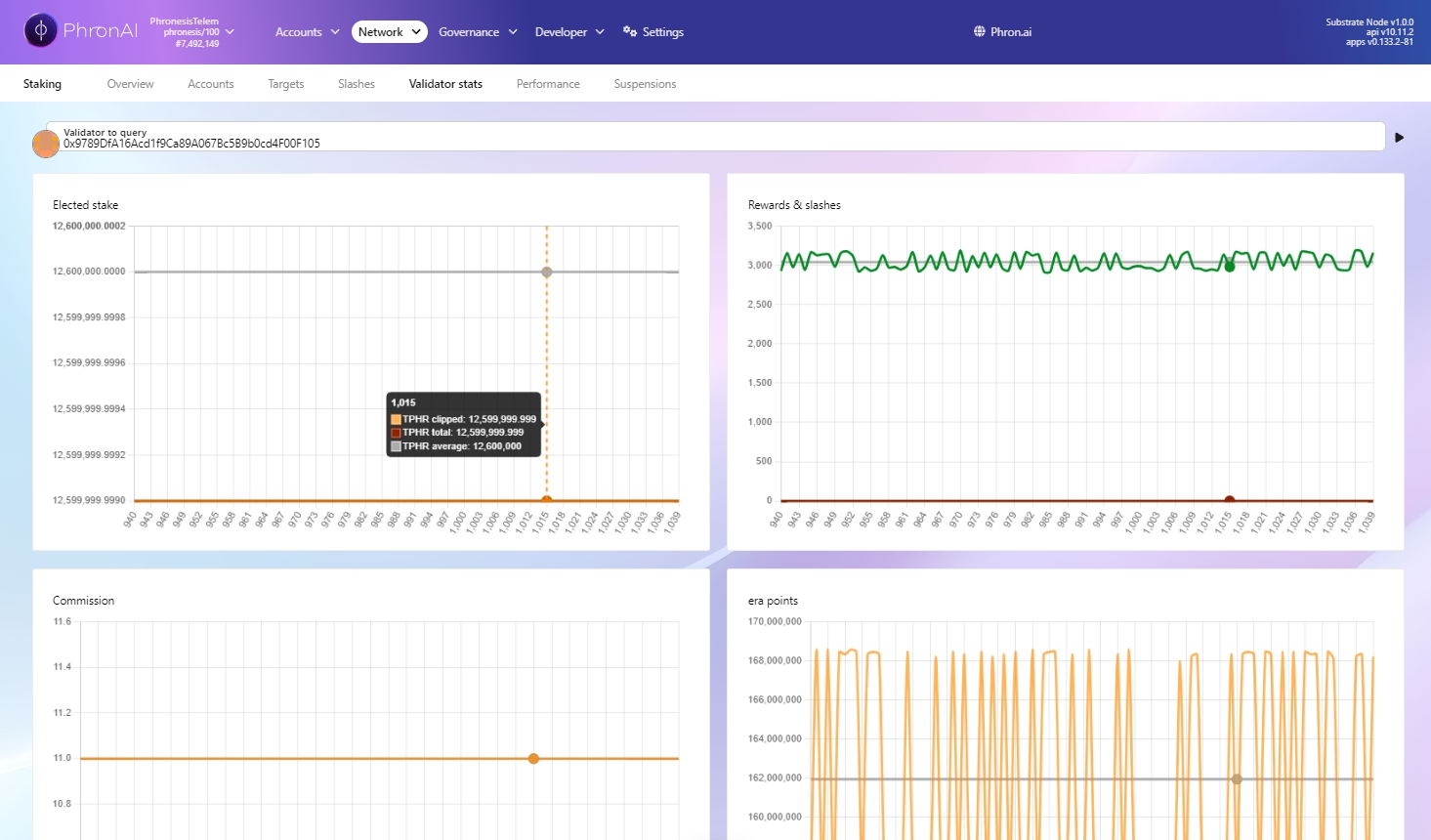
Overview of the Staking UI on dev.phron.ai
If you're ready to start staking immediately, you can jump to the section How to Start Staking With the Developer Wallet. The following section provides a deeper dive into the various tabs and menus available on the staking platform: https://dev.phron.ai/#/staking.
Most of the staking functionalities can be easily accessed through the Staking menu located under the Network tab.
The Staking menu includes the following tabs: Overview, Accounts, Payouts, Pools, Targets, Slashes, Validator Stats, Performance, and Suspensions. Below, we provide an explanation of the contents and purpose of each tab.
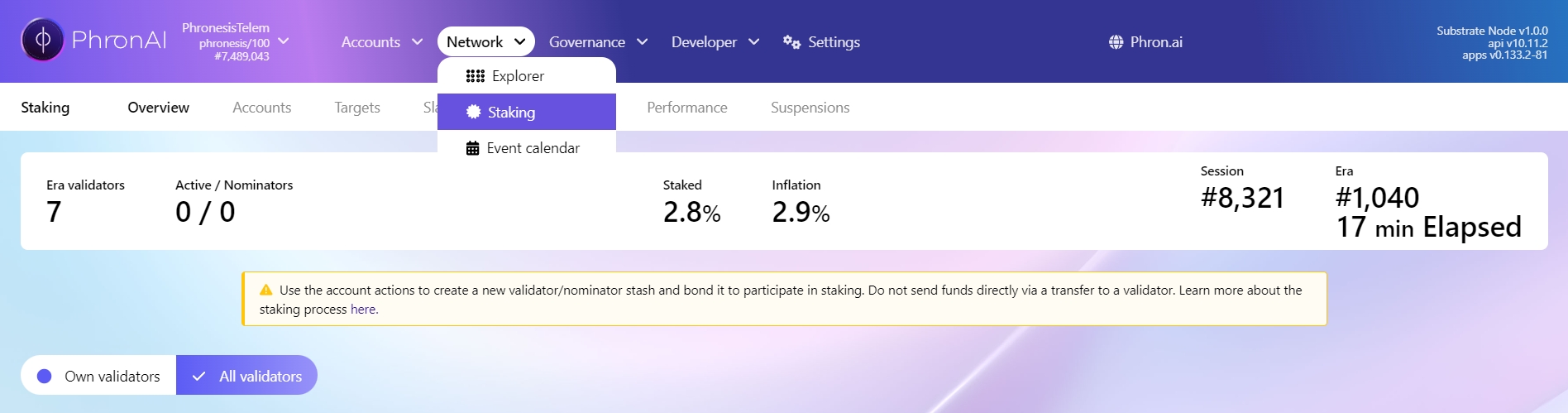
This tab provides key global staking data, including:
The number of validators elected in the current era.
The number of nominators in both the current and upcoming eras.
The total percentage of staked PHRON, shown as a fraction of all PHRON in circulation.
Current yearly inflation: Beginning on October 14th, 2024, 27 million coins will be emitted for the first year. This emission rate will reduce exponentially each year until the community-approved maximum supply of 520 million coins is reached.
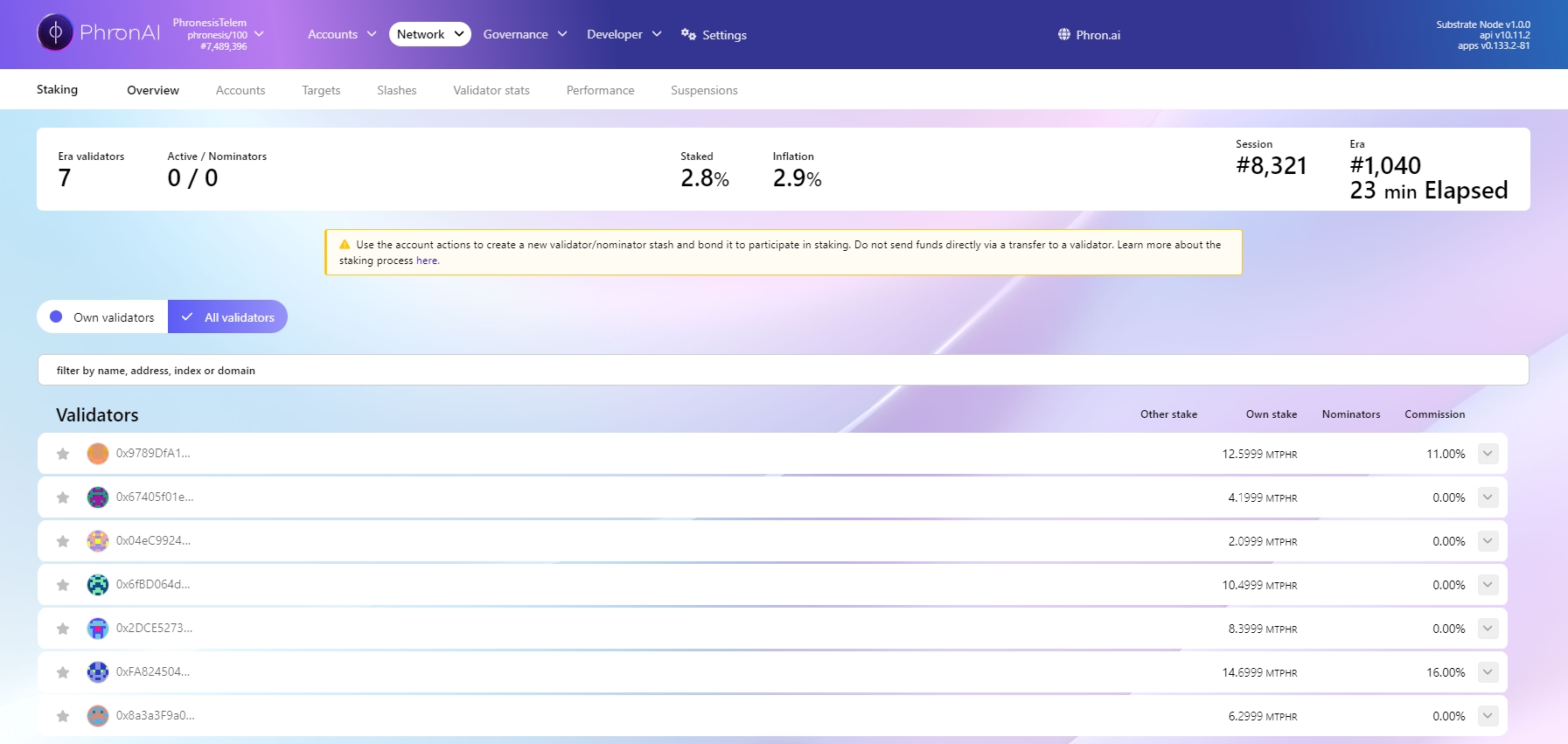
The table displays a list of all current validators, including their total stake (split into their own stake and that from nominators), a list of nominators, and their current commission rate.
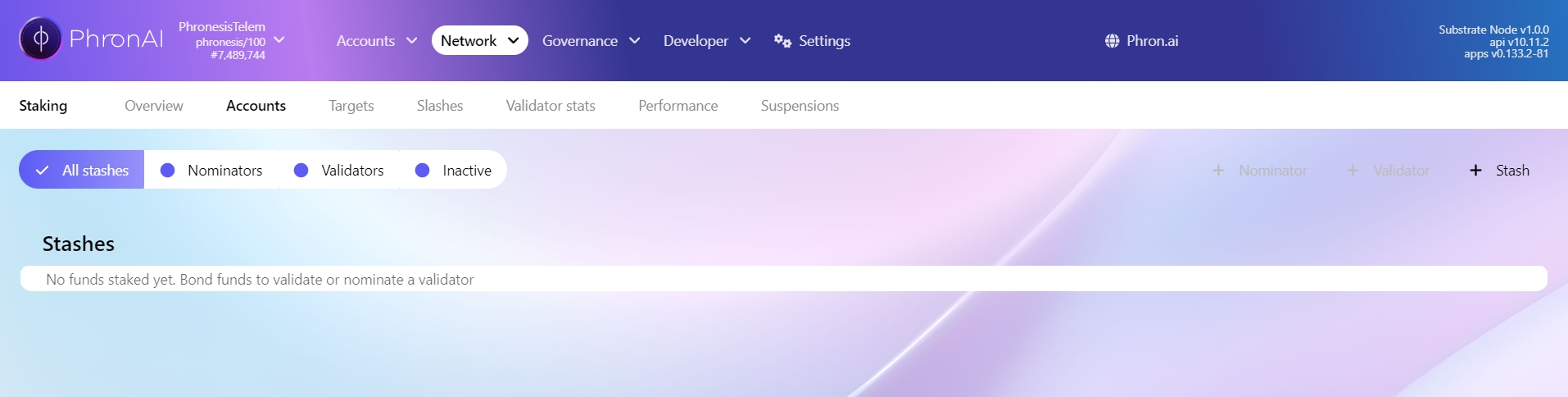
This tab displays a list of all your accounts involved in staking. Please note that an account will only appear here if it has been added in the Accounts tab or injected via a browser extension. From this tab, you can perform all staking-related actions, such as bonding or unbonding coins, as well as selecting or changing the validator you wish to nominate. To view the available actions for each account, click the three dots button at the end of the corresponding account line.
In the Stashed view, you can perform actions related to direct nomination, as well as actions for being a validator.
This tab displays a list of rewards that have been awarded (for eras that have ended) but not yet claimed (distributed to the validator and their nominators). Currently, this tab is not very useful, as the Foundation operates an automated service that triggers payouts to all nominators and validators whenever they are available (note that this does not apply to pools). Therefore, this tab will almost always be empty. This is expected, and seeing it empty does not mean you have never received any rewards. If you want to view your historical payouts, we recommend using —simply enter your account in the search bar to display your account details, including staking rewards.
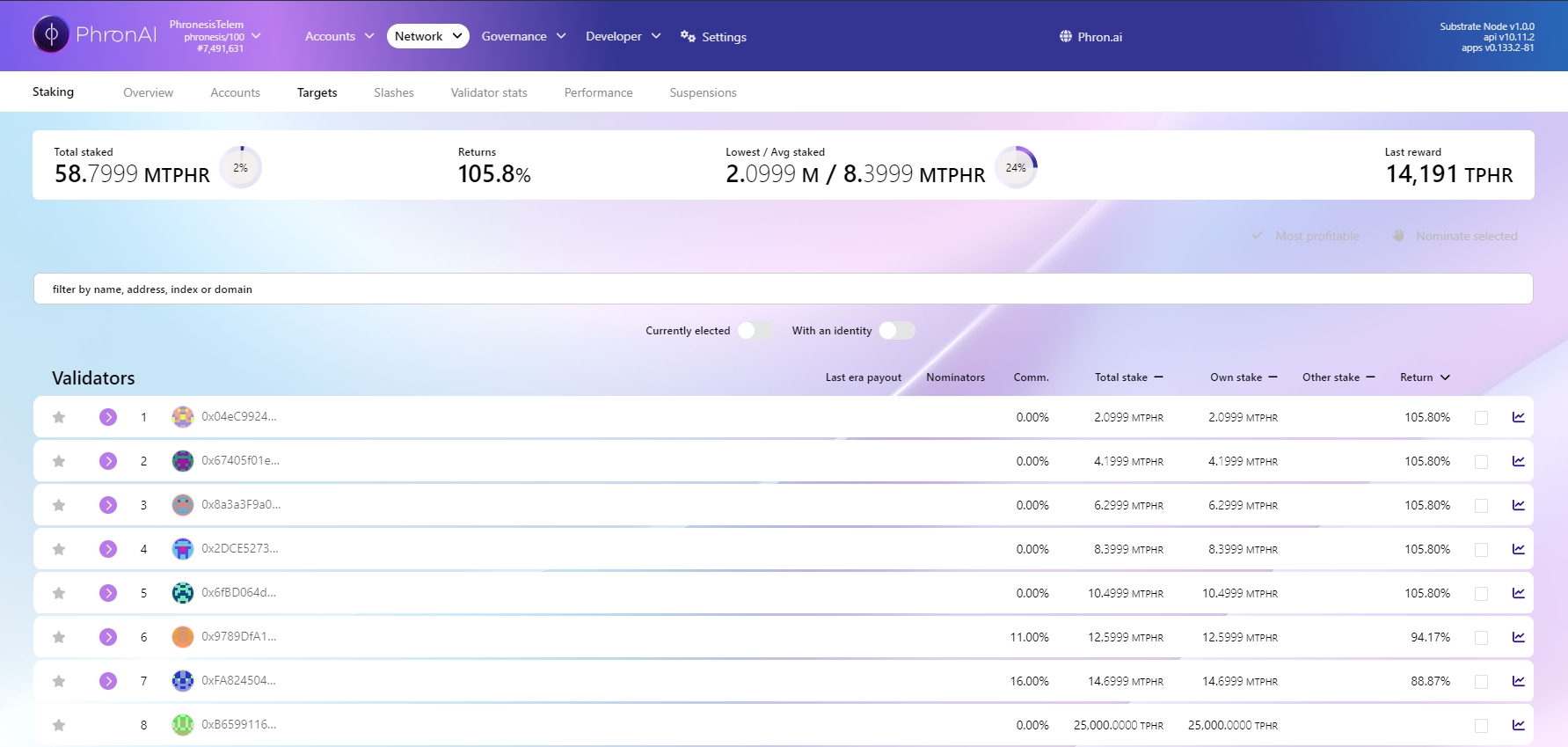
In this tab, you can easily analyze all available validators. Validators with a blue arrow next to them are currently part of the era committee. You can sort the list by parameters such as return, total stake, and others.
One of the defense mechanisms protecting the Phron blockchain against malicious agents is a slashing mechanism that financially penalizes users for disrupting the network's operations. The Slashes tab allows you to view users who have engaged in dishonest behavior and had their funds slashed. However, it's important to note that there is currently no automatic slashing on Phron. At the time of writing, there have been no reported cases of malicious behavior from any validators, so you will likely find this tab empty.
In this section, you can query the Account ID of any validator to view their basic statistics. This feature is primarily useful for validators, but as a nominator, you can also use it to assess the performance of your chosen validator, particularly to check for any recent sessions in which they may have underperformed. Below, you will find diagrams displaying:
Rewards received in a given era and the average reward up to that era.
Total stake for a given era.
Validator commission in a given era.
The history accessible by this tab goes back 84 eras.
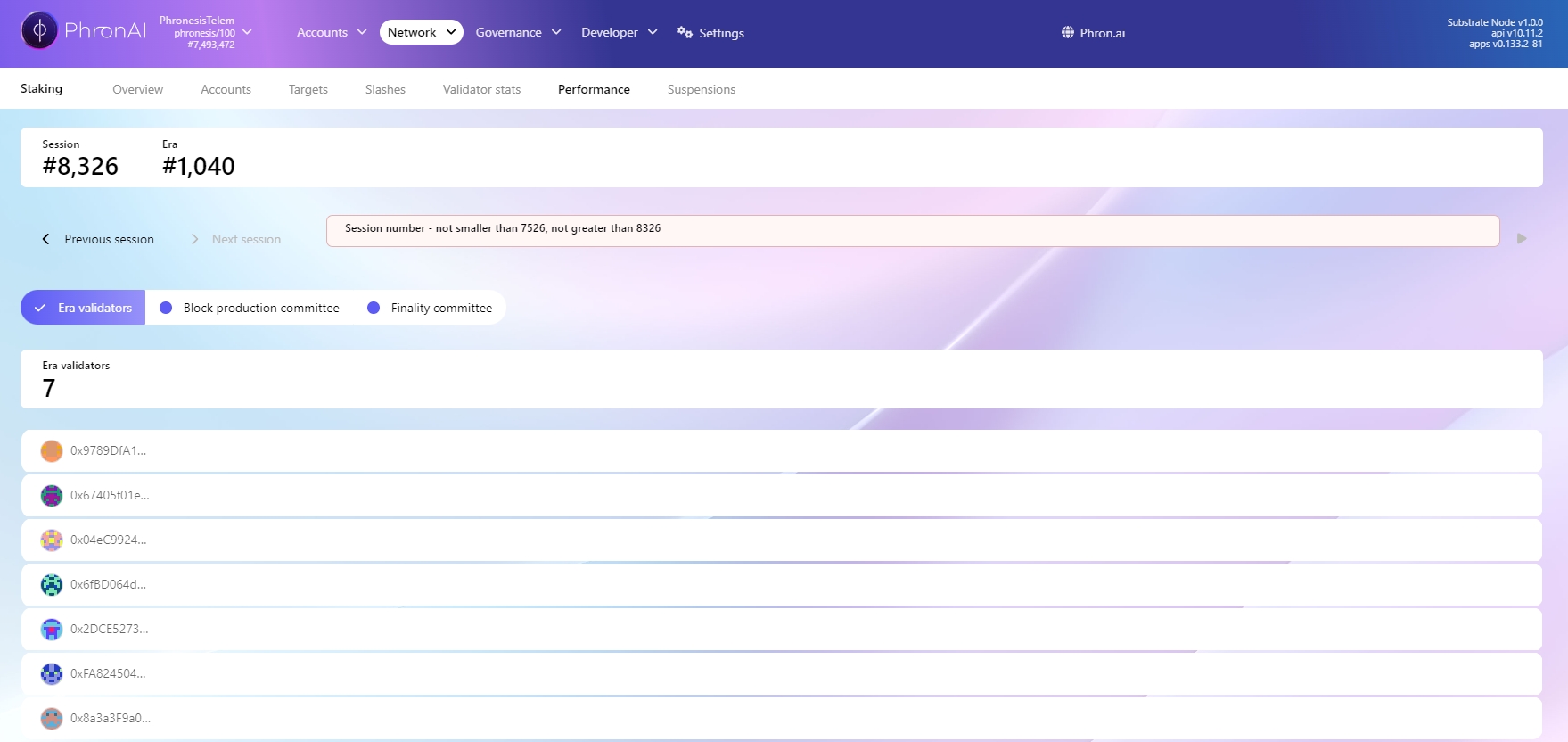
The Performance tab allows you to track the current session in real-time and analyze past sessions to see how many blocks each validator has created. This information is primarily of interest to validators, as the numbers do not directly indicate the rewards that validators or their nominators will receive. If you would like to explore this topic further, please refer to the Elections and Rewards Math section.
The current session number and era number.
Direct nomination, also known as standalone nomination, offers a personalized staking experience where you, as the user, act as the sole nominator. This approach provides you with complete control over your nominations, allowing you to select validators and adjust your stake without adhering to unbonding periods.
To embark on direct nomination, you'll need a substantial minimum stake, currently set at 100 PHR. Please note that this requirement may increase over time as the network evolves.
Access the Staking Tab: Navigate to the Staking tab within the interface.
Enable Stashed Mode: Ensure that the Stashed mode is activated in the top-left corner of the Accounts tab.
Initiate Nomination: Click the "Nominator" button to start the nomination process.
Configure Nomination Settings: In the pop-up window, select your Stash account, specify the desired amount of coins to bond, and choose your preferred reward destination.
Once you submit your nomination, it will initially appear as a "Waiting nomination" in the Accounts tab. This status will transition to "Active nomination" at the beginning of the next era.
Stash account (increase the amount at stake) - the rewards are sent to your stash account and automatically included in your bonded stake, meaning they will increase your future rewards.
Stash account (do not increase the amount at stake) - the rewards are sent to your stash account, but are not automatically bonded. They are available as transferable coins right away and do not contribute to future rewards, unless manually bonded.
Specified payment account - the rewards are sent as transferable coins to some other account of your choice.
To decrease the amount of staked coins while continuing as a nominator, please follow these steps:
Access the Staking Tab: Navigate to the Staking tab of the mainnet and select the Accounts tab. Ensure that the "Stashed mode" is enabled in the top left corner. You will see a list of all your accounts participating in direct nominations.
Select the Account for Unbonding: For the account from which you wish to reduce your stake, click the three dots at the end of the line and select Unbond funds.
Specify the Amount: In the pop-up menu, choose the amount of coins you would like to unbond. Please note that you cannot reduce your stake below the minimum amount of 100 PHR.
Complete the Unbonding Process: Click Unbond and sign the transaction.
To unstake all your coins and stop being a nominator, follow these steps:
Access the Staking Tab: Navigate to the Staking tab of the mainnet and select the Accounts tab. Ensure that the "Stashed mode" is enabled in the top left corner. You will see a list of all your accounts participating in direct nominations.
Stop Nominating: For the account from which you wish to stop nominating, click the Stop button at the end of the line and sign the transaction in the pop-up window.
Unbond Funds: Click the three dots at the end of the line and select Unbond funds.
Select All Bonded: In the pop-up menu, select the All Bonded toggle to ensure that all your funds will undergo unbonding. Entering the full value without this toggle may not work due to fractional coins that are not displayed in the UI.
Discover how to change your nominations while staking on Phron's secure blockchain, which incorporates privacy-enhancing technology.
Nominating a specific validator with your staked PHRON signifies your trust in their ability to act honestly and effectively produce blocks. As a nominator, it is your responsibility and in your best interest to ensure that your chosen validator is reliable and trustworthy. Always remember to do your own research.
If you decide to change your selected validator at any point, you can find step-by-step instructions below for both direct nominators and members of a nomination pool.
Select Validator: Choose the validator you wish to nominate from the available options.
Authorize Transaction: Confirm your nomination by authorizing the transaction.
View the Updated Nomination: In the Accounts tab, your updated nomination will result in a new entry appearing in the bonded column. The amount you chose to unbond will be indicated with a clock icon. Hovering over this icon will display the number of eras remaining in the unbonding period.
Withdraw Unbonded Funds: After the unbonding period has concluded, click the three dots button again and select Withdraw unbonded funds. Note that this option will be available only if your account has funds that have completed the unbonding process.
Finalize the Withdrawal: Sign the transaction to transfer your unbonded coins.
Complete the Unbonding Process: Click Unbond and sign the transaction.
View the Updated Nomination: In the Accounts tab, a clock icon will appear in the bonded column, indicating your modified nomination. Hovering over the clock will show the number of eras remaining in the unbonding period.
Withdraw Unbonded Funds: After the unbonding period has finished, click the three dots button again and select Withdraw unbonded funds. This option will be active only if the corresponding account has funds that have completed the unbonding process.
Finalize the Withdrawal: Sign the transaction to make your unbonded coins transferable.
Select the Account: For the account from which you want to change the nomination, click on the three dots at the end of the line and select Set Nominees.
View Current Nominations: In the pop-up menu, you will see your currently selected validator in the Nominated Accounts column.
Change Validator: Click on the validator’s name to remove it from the nominated accounts.
Choose a New Validator: Find your new validator in the Candidate Accounts list and click on it. The name should now appear in the Nominated Accounts column.
Finalize the Nomination: Click the Nominate button and sign the transaction to complete the process.
In the Accounts tab, your newly modified nomination will change the status from Active Nominations to Waiting Nominations. Your choice will become active at the beginning of the next era.
Please note that you will continue to nominate your previous validator until the end of the current era. This ensures that switching to a new validator does not create any gaps in your nomination period, allowing you to receive rewards without interruption during the transition.
Unlike the direct nomination mode, you cannot quickly switch to a different nomination pool and have the change take effect at the beginning of the next era. Instead, you must first leave your current pool, which requires waiting through a 14-day unbonding period, before joining the new pool.
For step-by-step instructions on how to do this, please refer to the sections related to nomination pools in How to Stop Staking and How to Start Staking With the Developer Wallet.
Follow these steps to stop staking on Aleph Zero, a secure blockchain with zk-proof technology.
Regardless of whether you are a direct nominator or a member of a nomination pool, you can decide to decrease your stake or withdraw from staking at any time. In either case, you will need to wait through the 14-day unbonding period before your coins are released and become transferable.
To decrease the amount of staked coins, but keep being a nominator please:
Access the Staking Tab: Go to the Staking tab of the testnet and navigate to the Accounts tab. Ensure that Stashed mode is enabled in the top left corner. You will see a list of all your accounts participating in direct nominations.
Select Your Account: For the account from which you wish to reduce your stake, click the three dots at the end of the line and select Unbond funds.
Specify the Amount: In the pop-up menu, choose the amount of coins you would like to unbond. Please remember that you cannot decrease your stake below the minimum amount of 2,000 PHRON.
Complete the Unbonding Process: Click Unbond and sign the transaction.
View Your Updated Nomination: In the Accounts tab, your newly modified nomination will result in a new entry appearing in the bonded column. The amount you decided to unbond will be indicated with a clock icon. Hovering over the clock will show you how many eras are left in the unbonding period.
Withdraw Unbonded Funds: After the unbonding period is complete, click the three dots button again and select Withdraw unbonded funds. Note that this option is available only if your account has funds that have finished unbonding and are ready to be withdrawn.
Finalize the Withdrawal: Sign the transaction. Your unbonded coins are now transferable.
To unstake all your coins and stop being a nominator please:
Access the Staking Tab: Navigate to the Staking tab of the testnet and select the Accounts tab. Ensure that Stashed mode is enabled in the top left corner. You will see a list of all your accounts participating in direct nominations.
Stop Nominating: For the account from which you wish to stop nominating, click the Stop button at the end of the line and sign the transaction in the pop-up window.
Unbond Funds:
For members of nomination pools the procedure of decreasing the amount of staked coins is almost the same as the one for completely leaving the pool. Please follow the steps below:
Access the Staking Tab: Navigate to the Staking tab of the testnet. Ensure that the Pooled mode is enabled in the top left corner.
View Your Accounts: In the Accounts section, you'll see a list of all your accounts participating in the nomination pools.
Select the Account: For the account from which you want to reduce your stake, click on the three dots at the end of the line, then select Unbond funds.
Click the three dots at the end of the line and select Unbond funds.
In the pop-up menu, enable the All Bonded toggle to ensure all your funds will be subject to unbonding. Entering the full value without this toggle on may not work due to fractional coins that are not displayed in the UI.
Complete the Unbonding Process: Click Unbond and sign the transaction.
Monitor the Unbonding Period: In the Accounts tab, your modified nomination will now show a clock icon in the bonded column. Hovering over this icon will display how many eras are left in the unbonding period.
Withdraw Unbonded Funds: After the unbonding period is complete, click the three dots button again and select Withdraw unbonded funds. This option will be available only when your account has funds that have finished unbonding and are ready for withdrawal.
Finalize the Withdrawal: Sign the transaction. Your unbonded coins are now transferable.
Choose the Amount to Unbond:
In the pop-up menu, specify the amount of coins you wish to unbond.
Important: You must maintain a minimum balance of 10 PHRON to remain a member of the nomination pool. If you intend to leave the pool entirely, toggle on the All Bonded option to unbond the entire amount. This ensures that you account for any fractional coins that may not be visible in the UI.
Confirm the Unbonding: Click Unbond and sign the transaction to initiate the process.
Monitor the Unbonding Status: In the Accounts tab, you'll notice a clock icon appearing in the Bonded column next to the amount you chose to unbond. Hovering over the clock will display the number of eras remaining in the unbonding period.
Withdraw Unbonded Funds: After the unbonding period is complete:
Click the three dots button again and select Withdraw Unbonded. Note that this option will only be available if your account has unbonded funds ready for withdrawal.
Sign the transaction to transfer your unbonded coins back to your account.
This guide will outline how to stake via the Phron Dashboard
First, you need to hold PHRON, which you can currently acquire through one of the available exchanges.
Currently, there are two ways to stake on Phron:
Direct Nomination: This method requires a significant minimum stake of 2,000 PHRON (as of the time of writing). Keep in mind that this minimum may increase in the future. With direct nomination, you have full control over your nominations and can change them freely without undergoing the unbonding period (which lasts 14 days).
Pooled Nomination: In this method, you join an existing staking pool that combines a group of stakers. One of the benefits is that you can stake as little as 10 PHRON. Additionally, it can be convenient for users who prefer not to select their own validator, as the pool operator makes that choice for you. However, there are some downsides: currently, switching between pools requires going through the unbonding period, and the only way to auto-compound your rewards is to manually claim them and periodically add them to the pool.
Head to the and create one account as per this tutorial OR directly via one of the compatible extensions (listed below). You only need one account to join a nomination pool.
If you already have an account, you can skip this process.
Next, you need to ensure that you are using a compatible browser extension. If you are already using one, you can skip this step. If not, you will need to install a compatible extension and restore your accounts. The available options (with linked tutorials) are:
Subwallet
Talisman
When you stake through a nomination pool, it is normal for your coins to be transferred out of your account. Your coins are sent and bonded to the pool, meaning they cannot be accessed by the pool operator. Once you unbond (a process that takes 14 days), you will be able to withdraw your coins from the pool.
Congratulations! You have successfully staked your coins through a nomination pool. The Pool Status in the Pools tab should now display as Nominating and Earning Rewards.
Starting with release 12.0, controller accounts are deprecated for new stakers. When bonding funds, you will be required to set the controller account to be the same as the stash account.
With the release of 13.0, you will have the option to use Proxy Accounts.
Create an Account: Visit the Mainnet web wallet and create an account following this tutorial or directly through one of the compatible extensions listed below. If you already have an account, you can skip this step. Make sure your account has enough PHRON to cover transaction fees.
Check Browser Extension Compatibility: Ensure that you are using a compatible browser extension. If you are already using one, you can skip this step. If not, you will need to install a compatible extension and restore your accounts. The available options (with linked tutorials) are:
Congratulations! You have successfully made a direct nomination! Your status should now show as Waiting for Active Nominations. Once the next era begins, this status will change to Nominating and Earning Rewards.
Navigate to the Phron Dashboard and click on the Pools tab.
Click Connect in the top right corner of the page and select your browser extension. This will prompt a pop-up from the extension.
In the pop-up, authorize the connection.
Select Imported Accounts and choose your account.
Click Join, which will take you to the All Pools section. Then, click Join next to your desired pool.
Enter the amount you wish to bond to the pool and submit the transaction via the extension. Depending on your settings, you may need to enter your account password at this point.
Talisman
Access the PHRON Dashboard: Navigate to the Nominate tab.
Connect Your Wallet: Click Connect in the top right corner of the page and select your browser extension. This will prompt a pop-up from the extension. Authorize the connection in the pop-up.
Select Your Account: Click on Imported Accounts and choose your stash account. If you are using proxy accounts, you can select either the proxy or proxied account, and the dashboard will import both for you. The proxy account will be used to sign staking transactions from this point forward.
Start Nominating: Click Start Nominating and follow the prompts until you reach the summary. You will need to enter or select the following details:
Reward Destination
Validator
Amount to Stake
Finalize Your Nomination: Once you reach the summary, click Start Nominating and sign the transaction via the extension. Depending on your settings, you may need to enter your account password at this stage.
This document provides a comprehensive explanation of the PHRON node staking process, focusing on how rewards are calculated, distributed, and influenced by key factors such as Annual Percentage Rate (APR) and total node participation. By detailing these mechanisms, this guide will help node operators understand the staking process and optimize their rewards over time.
Node Name: Zeus The node's name, Zeus, serves solely as a label and does not influence the staking or reward calculation processes.
Tokens Required: A minimum of 200,000 PHR tokens is required to set up and operate a Zeus node. These tokens remain locked within the node for the entire duration of its operation unless otherwise modified by the validator.
Price at Public Sale: During the public sale, 200,000 PHR tokens were valued at $14,200, which equates to a price of approximately $0.071 per PHR token.
Total Number of Nodes: The total number of available nodes in this scenario is 500, and the rewards pool is equally divided across these nodes unless a portion of stake is opened for nominators.
Total Supply of PHRON: The total supply of PHRON tokens is 2.1 billion.
Staking rewards are distributed on a monthly basis, with both the APR and the total number of PHRON rewards decreasing over time. Node operators receive rewards in proportion to the performance and duration of their staked tokens, and they can open up part of their stake for nominators to participate..
2.1 Key Factors Affecting Rewards:
APR (Annual Percentage Rate):
The APR represents the annual return on the staked PHRON tokens.
The APR begins at a higher rate and gradually declines over time, meaning the annualized return decreases as more time passes.
For instance, if the APR is 13.79%, the annualized return for stakers is 13.79% of their staked tokens, although this return is distributed monthly.
Total Rewards (PHRON):
Each month, a predetermined number of PHRON tokens is allocated for distribution to all stakers.
The total amount of rewards diminishes over time, aligning with the reduction in APR.
Distribution Among Validators and Nominators:
Validators can choose to stake up to 75% of the required node tokens and leave the 25% open for nominators. This allows nominators to stake additional tokens and share rewards proportionally based on their contribution.
This section outlines the PHRON node rewards distribution mechanism, focusing on how rewards are allocated between validators and nominators, and the new flexibility provided to validators in managing their stake.
In the system, 100% of the rewards generated by node staking are distributed to validators (also referred to as node operators) and nominators. This ensures that all participants contributing to the node's operation receive their fair share of the rewards.
Validators: Validators are responsible for maintaining the integrity of the blockchain by validating transactions and blocks. Their contribution is critical to the network’s security and performance.
Nominators: Nominators support validators by staking their own tokens on the validators they trust to act correctly and honestly within the network.
The total rewards generated in each staking cycle are proportionally divided between the validator and any nominators, depending on the percentage of stake each party holds.
In addition to managing the technical aspects of the node, validators now have the flexibility to open a portion of their node's stake requirement for public participation from nominators. Specifically, validators can set up their nodes to allow up to 25% of the required stake to be filled by nominators.
Example Scenario:
Consider the case where a validator is required to stake 200,000 PHRON tokens to operate a node. The validator has the option to modify their stake as follows:
The validator can choose to personally stake 75% of the node’s required tokens (150,000 PHRON).
This leaves 25% of the required stake (50,000 PHRON) open for nominators to contribute.
By allowing nominators to contribute, the validator enables other users to participate in the network while still maintaining control over the majority of the node's stake.
Once nominators begin to stake on a validator’s node, the validator has the option to retrieve the extra tokens staked by nominators if they wish. This feature provides the validator with flexibility over the node’s total staked amount:
If the validator decides to retrieve the extra tokens (e.g., the tokens staked by the nominators), the validator will hold a larger percentage of the total stake and, consequently, will receive a higher share of the rewards.
If the validator does not retrieve the tokens, the total stake will remain as is, and rewards will be distributed based on the percentage each party holds.
The staking rewards are distributed proportionally based on the percentage of total stake held by the validator and the nominators. This ensures a fair and transparent system, where both validators and nominators are rewarded according to their contribution.
Assume the following distribution on a node:
Validator holds 85% of the total staked PHRON.
Nominator 1 has contributed 5%.
Nominator 2 has contributed 10%.
The rewards generated by the node will be allocated based on these percentages:
The validator, holding 85% of the total stake, will receive 85% of the total rewards.
Nominator 1, holding 5% of the total stake, will receive 5% of the total rewards.
Nominator 2, holding 10% of the total stake, will receive 10% of the total rewards.
This proportional rewards distribution model ensures that all participants—whether they are validators or nominators—are rewarded in alignment with their respective stakes.
The flexibility offered by this model benefits both validators and nominators:
For Validators: Validators can control the majority of the stake while allowing nominators to contribute the remaining portion. This allows validators to operate their nodes with a lower personal stake if needed while still retaining the option to reclaim the tokens contributed by nominators.
For Nominators: Nominators, who may not have enough tokens to operate a node independently, are now able to contribute to an existing validator's node and earn rewards in proportion to their stake.
This system provides an inclusive and adaptable framework, encouraging wider participation in the network while maintaining the integrity and control of validators over their nodes.
Example of Month 1 Rewards:
APR for Month 1: 13.7927%
Total Rewards for Month 1: 24,137,262.43 PHR Tokens.
The total reward of 24,137,262.43 PHR is distributed evenly among 500 nodes.
Rewards per node for Month 1: Reward per node = 24,137,262.43 / 500 = 48,274.52
Thus, each Zeuss node would receive 48,274.52 PHR tokens as rewards in Month 1.
APR for Month 2: 13.1005%
Total Rewards for Month 2: 45,851,763.07 PHR Tokens.
The total reward of 45,851,763.07 PHR is distributed evenly among 500 nodes.
Rewards per node for Month 2: Reward per node = 45,851,763.07 / 500 = 91,703.53 PHR
Thus, each Zeuss node would receive 91,703.53 PHR tokens as rewards in Month 2.
Accumulated Rewards Over Time
Lets Calculate the total accumulated rewards for a node over a period of 6 months.
48,274.52 + 91,703.53 + 131,782.07 + 169,323.41 + 204,833.06 + 238,653.32
= 884,569.91 PHRON tokens.
If a node is staked for 12 months, the total rewards can be projected as:
271,030.37 + 302,149.17 + 332,153.57 + 361,158.42 + 389,257.49 + 416,528.71
= 2,072,277 PHRON tokens.
Validators and Nominators: Flexible Staking Example
Validators can open up to 25% of their node’s stake for external nominators to participate. For example:
Validator holds 85% of the node’s stake.
Nominator 1 contributes 5%.
Nominator 2 contributes 10%
Validator receives 85% of total rewards.
Nominator 1 receives 5%
Nominator 2 receives 10%
4
12.09%
84,661,707.04
169,323.41
5
11.70%
102,416,527.58
204,833.06
6
11.36%
119,326,661.82
238,653.32
10
10.32%
180,579,208.34
361,158.42
11
10.11%
194,628,744.71
389,257.49
12
9.92%
208,264,354.83
416,528.71
Month
APR(%)
Total Rewards (PHRON)
Rewards per Node (PHRON)
1
13.79%
24,137,262.43
48,274.52
2
13.10%
45,851,763.07
91,703.53
3
12.55%
65,891,034.48
131,782.07
Month
APR(%)
Total Rewards (PHRON)
Rewards per Node (PHRON)
7
11.06%
135,515,183.25
271,030.37
8
10.79%
151,074,585.82
302,149.17
9
10.54%
166,076,782.61
332,153.57